
Spring, 2026
Waiting for Claude’s
Product Designer
A dispatch on chips, taste, and the rooms
our software asks us to live in.
Safely inside Taurus season on the 21st of April, I did something suspiciously practical: I re-downloaded ChatGPT. Tauruses are, I am told, known for good taste[1]. A piece of astrological gossip I mention by way of disclosure. Some readers, the diligent kind, notice benchmark charts first. I notice whether a button has been loved.
The last time I had really lived with the macOS app was January 2025, which in AI years is somewhere between the late Renaissance and last Tuesday. Back then, most desktop AI products still looked as though a terminal had put on a blazer. Useful, yes. Occasionally miraculous, yes. But rarely designed in the old-fashioned sense of the word. Considered, beyond merely arranged, merely styled, merely shipped.
This time, the difference was immediate. ChatGPT had become calmer. More intentional. It had stopped behaving like a demo trying to prove itself and started behaving like a proper macOS application, which is to say, a thing that knows it is sitting on a particular operating system, with particular conventions about what a window ought to look like when one tabs away from it and what a chip ought to look like when one hovers. The composer has been widened. The sidebar has thinned. The typography has stopped hectoring. Files arrive as chips, not as monologues. Tools name themselves. Even the model selector, once a sullen drop-down menu, has been promoted to an object with weight and a small, declarative shadow. The whole thing coheres the way a good copy editor coheres a paragraph: by removing things.
It had, more than anything, the feeling of Linear: dense without being hostile, functional without becoming grey oatmeal, modern without screaming that it had recently discovered glassmorphism. It also had a quality Linear cannot quite afford: the air of an application that knows it is going to be opened forty times a day for the rest of one’s working life, and has dressed for the long acquaintance accordingly. Daily software is a different garment from ambitious software. ChatGPT, on this evidence, has finally noticed which one it is.
This is the curse and the pleasure of being a Taurus with a software habit. One can admire the model while still being offended by the room it has been asked to live in.
What makes an application feel native on macOS is inheritance. Apple’s macOS frameworks (AppKit, the long-standing macOS toolkit, with roots in NeXTSTEP, refined inside Apple since the launch of Mac OS X, and SwiftUI, the modern declarative one introduced in 2019), together with the Human Interface Guidelines that sit beneath them both, constitute one of the most deeply considered design languages in modern software. Every menubar convention, every sheet animation, every drag handle, every spacing constant has decades of intent behind it. None of it is arbitrary; none of it is the product of a single committee on a single afternoon. It is, in the literal sense, a tradition. To ship an application on macOS that honours this tradition is to feel like a piece of furniture made for the room. To ship one that ignores it, that, say, ports the web app into a window and calls it a desktop product, is to feel like something delivered, slightly oversized, from elsewhere. The body, as ever, can tell.
This is what the new ChatGPT macOS app has understood, and what most of its peers have not. The dispatch from here on is, in a sense, a tour through who has accepted the inheritance and who has tried, sloppily, to fake it.
A clearing of the table is in order before the dispatch goes any further. The new ChatGPT macOS app is not the smartest model in the room. The model rankings are not, in fact, in dispute, and they are not in OpenAI’s favour.
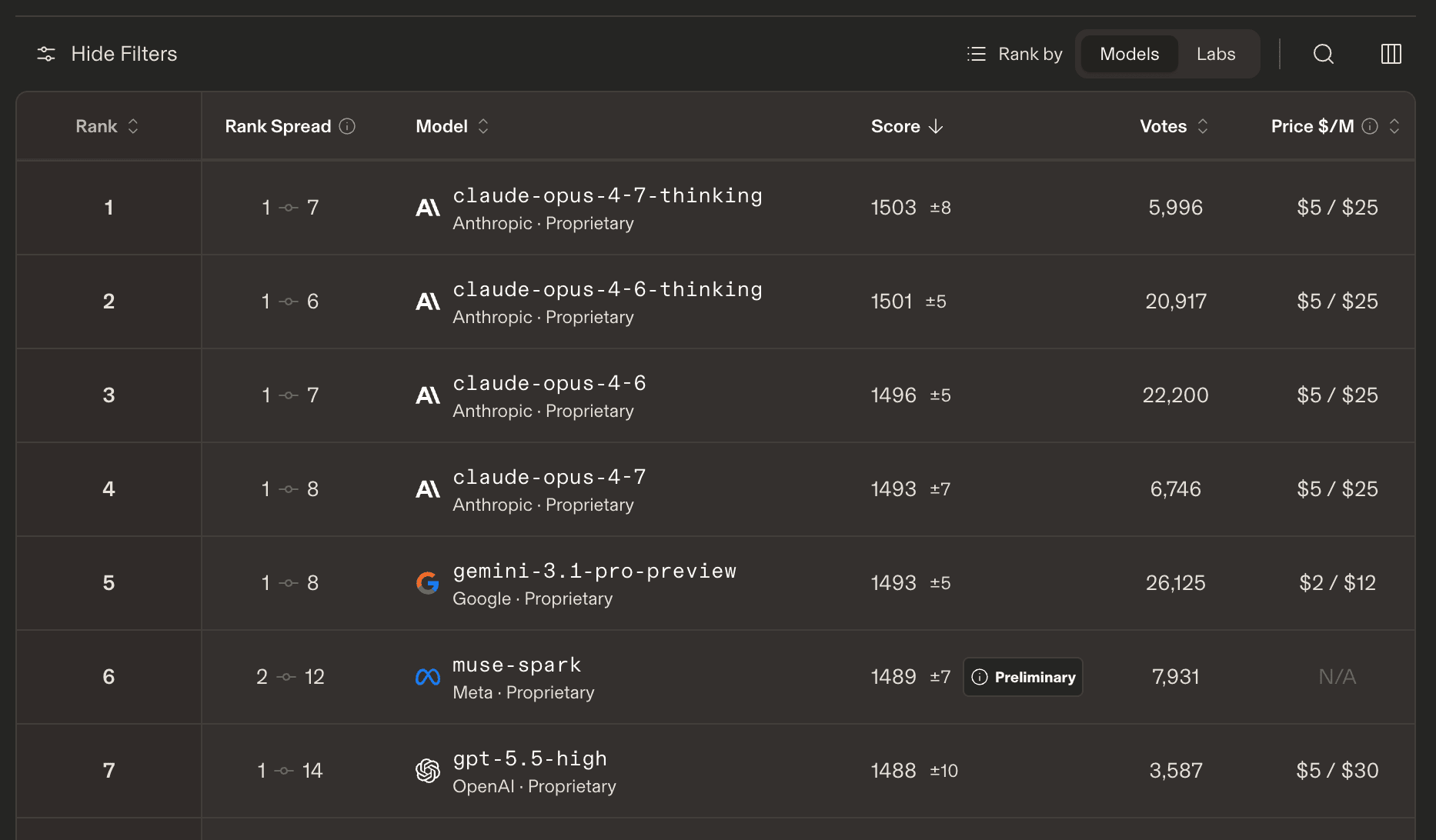
An LMArena snapshot, current. Anthropic owns the top rows.
The complaint of this dispatch is not, has never been, about that.
In any current LMArena snapshot, Anthropic owns the rows that matter most to a benchmark: Claude Opus 4.7 Thinking, Claude Opus 4.6 Thinking, Claude Opus 4.6, Claude Opus 4.7. GPT-5.5 High sits lower down. Fine. Let Claude be brilliant; the complaint of this dispatch has never been that Claude is dumb. It is that model intelligence and product intelligence are not the same thing. And that the design conversation, after several years of being treated as a luxury layer, has, at long last, started to count.
OpenAI’s evidence on macOS is not only ChatGPT. Codex.app, the company’s other native surface on the platform, makes the case more sharply still, and on a different axis. Where ChatGPT.app has rediscovered the dignity of a daily writing tool, Codex.app has rediscovered the dignity of a workbench.

A Codex composer. Computer Use and gstack appear as chips, not implications.
The point is legibility.
The chips are what got me. In the screenshot, Computer Use and gstack are not hidden in some context drawer or implied by prompt magic. They are little objects, with icons and colour and edges. One can see what the system is holding. One can see what is being invoked. It is a small product decision with a large psychological effect: the machine feels less like a black box because the interface gives the eye something to trust.
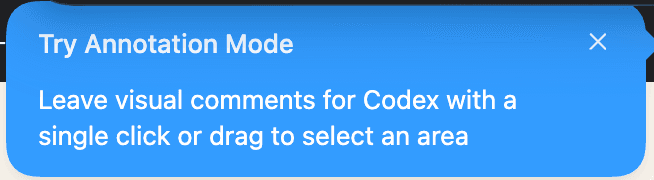
Annotation Mode. A small product decision with a large consequence:
the interface becomes something one can point at, not just talk around.
Codex has also added an Annotation Mode: one can now make inline changes and leave comments directly on the running interface, Figma-style, except that the audience here is the AI agent itself. Reve, the image editor, shipped something close to it a few weeks earlier: click on the part of the picture one wants altered, type the alteration, watch the model respond to the gesture itself, no paragraph of description required. The pattern, briefly, is this: feedback in the AI macOS apps has stopped being a paragraph one writes. It has become a gesture one makes on the thing itself.
Codex.app is the cleanest example, on the platform at the moment, of what happens when a serious model is given a serious house. It feels like a command centre for work: parallel agents, isolated worktrees, reviewable diffs, visible progress, automations, reusable skills, and, now, visual annotation. It has a point of view about how humans supervise machines. It asks what can the model do? And then it asks the harder question, what would make this power feel governable?
That is design.
Claude.app, by contrast, is a bit clunky, and it often feels like a brilliant academic who has been asked to host a dinner party and has spent the evening explaining the furniture, the kind of host who corners one near the bookshelf to discuss Heidegger, and whose canapés, when finally located, turn out to be impeccable. It has the Woody Allen problem in the most literal interface sense: endless intelligence, exquisite anxiety, too much narration, not enough staging.
The shape of the clunk is familiar, though, and worth naming. Claude.app on macOS reads the way a Google product on macOS reads: slightly off, in the body-recognises-it-instantly way that always traces back to a design system imported from elsewhere. Material Design is, in its own context, an admirable system: it has its own typography, its own elevation and shadow conventions, its own animation curves, its own opinions about how a card or a sheet should behave, an entire grammar that has held up across more than a decade. Its native context, however, is the web and Android. Material on macOS feels rather like a thoughtful Continental architect asked to retrofit a Manhattan brownstone: the grammar is impeccable, but it was learnt somewhere else. AppKit and SwiftUI are the local language of macOS; UIKit is the iOS counterpart, related but not, in any honest sense, interchangeable. Claude.app, like Material on macOS, has a vocabulary, but it isn’t this one. The difference is small paragraph by paragraph and instantly felt in aggregate: the way one’s body knows, walking into a building, whether the architect was local.
None of this is an intelligence complaint. Claude is often magnificent. Claude Code can feel like having a very serious, very capable collaborator who has read every file and will not be distracted by the shallow pleasures of typography. For reasoning, writing, long context, and careful thought, Claude remains one of the most impressive products in the category.
But the product has a persistent awkwardness. The orange. The icons. The hidden affordances. The faint aftertaste of a 1970s terminal that has been talked, late in life, into a turtleneck. The sense that the interface was permitted to exist only after the serious people finished the serious work.
The contradiction lives on the home screen. Evening, Setareh is a warm greeting, and a good instinct; but around it sits an interface that still feels administrative: a skinny left rail packed with recent tasks, small labels, muted grey controls, and a centre area that is at once empty and busy. It gestures at personalisation, then drops one back into a workspace that resembles a filing cabinet with a Rhodes scholar inside it.
The result is that Claude sometimes feels like a place to submit a request, when it might have been a place to think. That distinction matters. A request box is transactional. A designed space changes how one behaves inside it.
Two applications can hold the same model and feel, on opening, like entirely different products. The room around an interface contains the conversation, and it shapes who one becomes inside it.
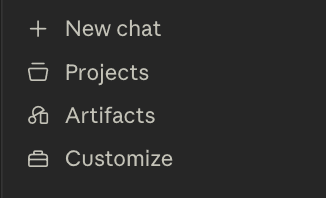
Claude’s left navigation, cropped close. The icons are low-contrast;
the Artifacts mark in particular takes work to parse.
This is the small stuff that people pretend is subjective until it quietly ruins the day. The cropped Claude menu has the shape of a product that knows what it needs to expose but has not yet decided how those things should feel. New chat is clear. Projects is fine. Artifacts looks like a symbol from a half-remembered enterprise procurement portal. Customize is a briefcase. None of this breaks the model. It does something quieter and worse: it makes the intelligence feel less cared for.
Karri Saarinen, the co-founder and chief executive of Linear, put the issue cleanly in “Output isn’t design.” The industry keeps confusing production with design, as though generating a screen, a flow, a prototype, or a page meant the underlying problem had been solved. It has not. Design is not the artefact. Design is the judgment that decides what should exist, how it should behave, what it should refuse, where the tension lives, and what kind of person the user is allowed to become while using it.
That last part sounds precious until one places it next to AI.
Because AI is not normal software. Normal software waits. AI software increasingly acts: it reads, writes, summarises, schedules, buys, edits, generates, deploys, explains. The more agency handed to these systems, the more the interface becomes a question of trust. The relevant kind of trust is a physical sensation: do I know where I am, what this thing is doing, why it is doing it, and how to stop it?
This is why delight is not frivolous. Delight is one of the ways a product tells the user that someone cared enough to make the interaction legible. It is the opposite of the bank phone-tree voice that asks one, with dead-eyed cheer, to state the problem in a few words and then punishes the speaker for sounding human.
Bad design in AI will be disorienting, well past annoying. It will make intelligent systems feel haunted by bureaucracy. It will make capable models feel unsafe because the interface gives no grip.
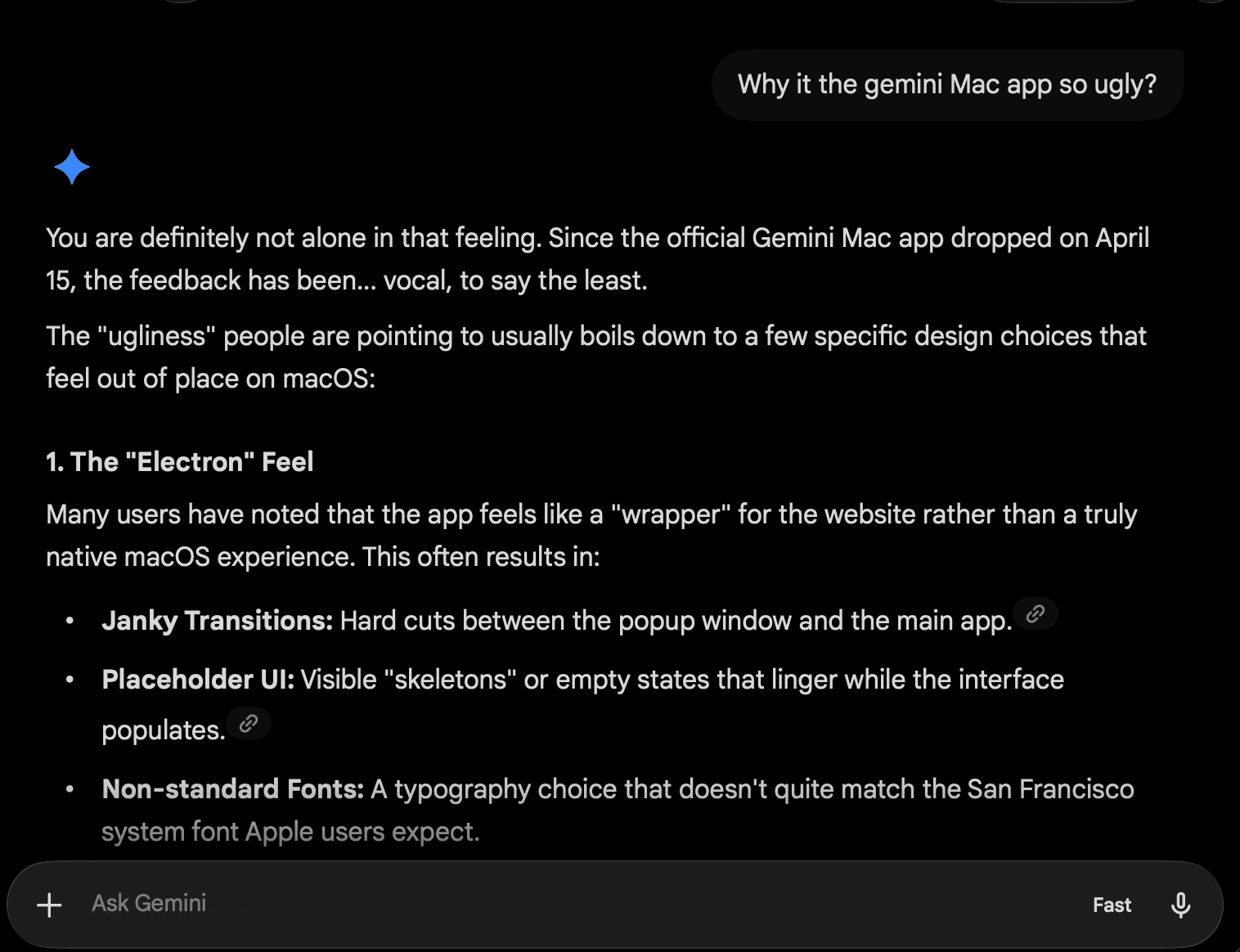
Gemini, asked why its macOS app is ugly, supplies its own design critique.
The list is brutal because it is specific.
And then there is Gemini.app[2], which somehow manages to make the critique visible inside the product itself. Asked why its macOS app feels ugly, Gemini answers, more or less, that people can tell when a desktop app feels like a web wrapper. Hard cuts between windows. Skeleton states hanging around too long. Typography that does not feel native on macOS. The kind of list a senior designer might write in a damning internal memo, here returned politely on request.
Taurus propaganda aside, that is the thing about taste. People may not have the vocabulary for it, but they feel the mismatch instantly. They may not say non-native typography or transition discontinuity. They say, why is this ugly? The body knows before the design review does.
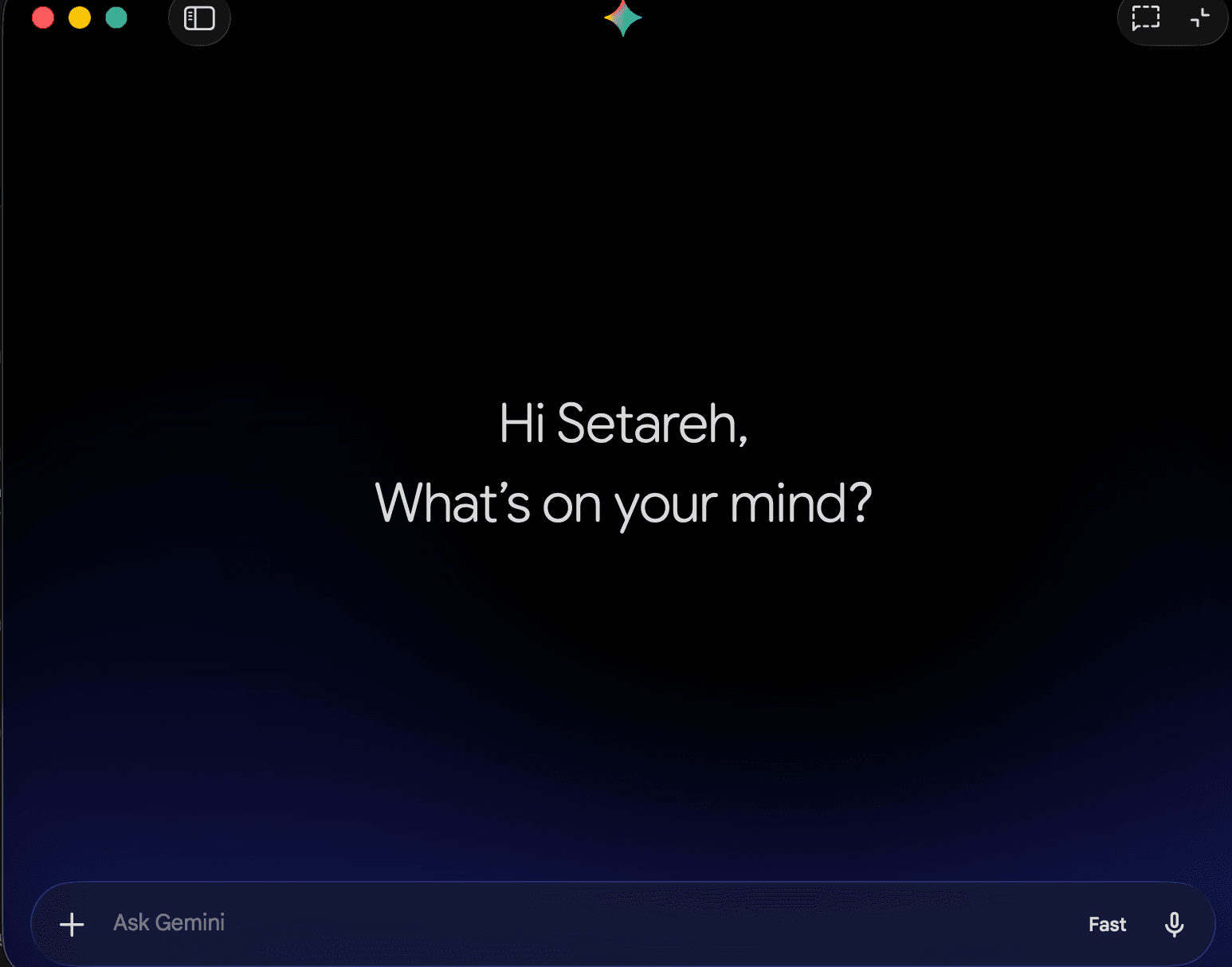
The Gemini.app home state. Clean, familiar, almost aggressively generic:
the now-standard altar of the AI macOS app.
The Gemini home screen, by contrast, looks like a meeting nobody chaired. The colour palette is a glossy violet-into-navy gradient: the exact sky from the DreamWorks Animation intro, the one with the small boy fishing on a crescent moon. The boy is mercifully absent; the little sparkle hovering above the input has been quietly deputised in his place, presumably so as not to violate copyright. I have, I confess, no idea who signed off on this palette, and even less idea why a frontier AI lab decided that the opening fifteen seconds of Shrek was the right gateway aesthetic for one of the most powerful machines ever built.
This is, in different keys, the design problem the AI macOS apps share. The most powerful objects ever shipped on the platform are arriving in front doors no one quite finished.
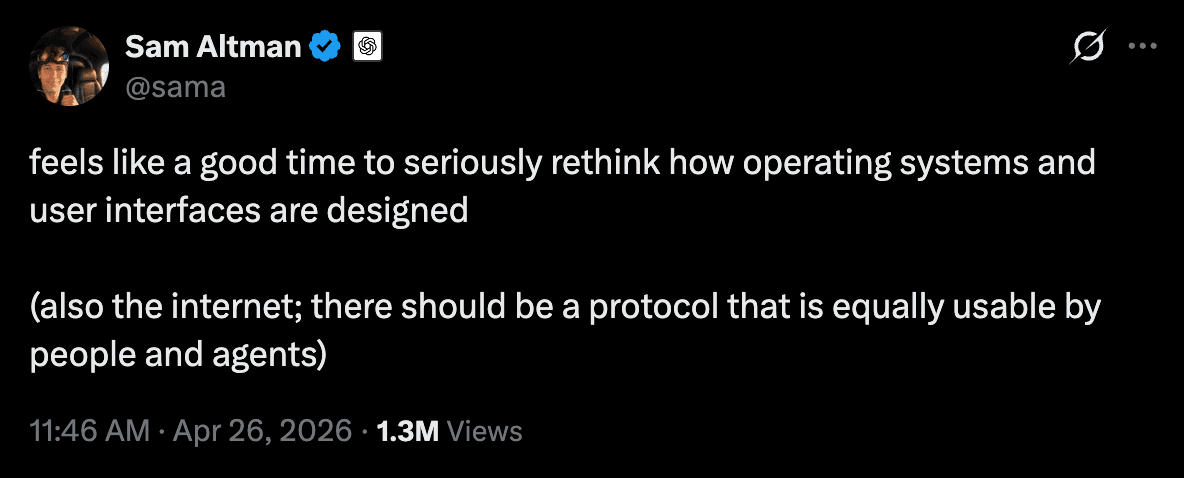
Sam Altman, the 26th of April. Two sentences.
The timing does most of the work.
The week this dispatch was being written, Sam Altman posted: feels like a good time to seriously rethink how operating systems and user interfaces are designed. Two sentences, but the timing is doing most of the work. It arrived as OpenAI shipped more product surface than model capability, by my count for the first time.
He is right, and the reason is sitting on the macOS dock. The AI applications shipping today are constrained by their own design budgets and, just as much, by the platform underneath. macOS, for all its considered grammar, was designed for software that waits. Its conventions are extraordinary at the things they were meant to do; they have almost nothing to say about software that acts: software that decides, drafts, undoes, asks for consent on operations one did not initiate, and needs somewhere to surface uncertainty in a vocabulary the existing UI does not yet possess.
He is right for a quieter reason as well. The desktop we inherited from the 1990s, for all that has been added to it since, still asks every person who sits down at it to be roughly the same person. My mother’s computer should not be my computer. Not spiritually. Not metaphorically. Actually. Her macOS should have fewer buttons, fewer affordances, fewer file-system rituals she never asked to learn, all of it built around the things she actually does: reading, paying, calling, recovering from a click she did not mean to make. Mine can keep the terminal, the logs, the worktrees, the sharp tools. The same machine should be able to become two different machines for two different people. The generic desktop, served indifferently to everyone, is the last great unfinished design problem of the era.
A macOS rethought for this moment would do both at once. It would be a system whose default grammar knew what an agent was, what consent looked like for actions one did not directly cause, where uncertainty lived, how to surface and reverse what had quietly happened in another tab. And it would be a system whose defaults adapted to the person sitting in front of it: different button density, different default verbs, different warning language, different assumptions about confidence and speed. ChatGPT.app and Codex.app are early sketches of what the applications inside such a system might feel like. The system itself, for all its decades of intent, remains to be drawn for the era it is arriving in.
All of which brings the dispatch back, somewhat unwillingly, to its title. Because Claude is important, and that is precisely the issue. A mediocre product can get away with indifferent design. A great model cannot. The gap becomes embarrassing. It is rather like watching a concert pianist perform under fluorescent lighting at the DMV: the least Manhattan lighting imaginable.
I do not have a conclusion, on this or on most subjects worth writing about. What I have are observations.
That the AI companies, having spent three years competing on benchmarks, have quietly begun to compete on taste; and that the rooms our software asks us to live in have, in the same moment, become the design question of the decade. Forster’s only connect, it turns out, was always about interfaces too.
That Claude is too good a model to live in its current macOS app: a complaint dressed as a compliment, the only kind worth writing down.
That thoughtful design, in this moment, is the load-bearing wall of AI; and that what will survive of any of these models, after Larkin, is the rooms in which we kept them.
From the desk of,
— S.L.